
User`s guide

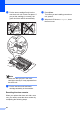

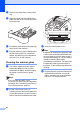
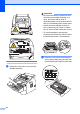
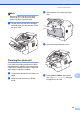
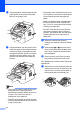
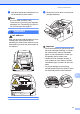
Table Of Contents
- Basic User’s Guide FAX-2840/FAX-2950/MFC-7240/MFC-7290
- User’s Guides and where do I find them?
- Download optional software from the Brother Solutions Center (FAX-2840 users only)
- Table of Contents
- 1 General information
- 2 Loading paper
- 3 Loading documents
- 4 Sending a fax
- 5 Receiving a fax
- 6 Using PC-FAX (For FAX-2950, MFC-7240 and MFC-7290)
- 7 Telephone and external devices
- Voice operations
- Telephone line services
- Telephone Service for Australia
- Telephone Service for New Zealand
- Telephone Service for Some Countries
- Connecting an external TAD
- External and extension telephones
- 8 Dialling and storing numbers
- 9 Making copies
- 10 How to print from a computer (For FAX-2950, MFC-7240 and MFC-7290)
- 11 How to scan to a computer (For FAX-2950, MFC-7240 and MFC-7290)
- A Routine maintenance
- B Troubleshooting
- C Menu and features
- D Specifications
- Index

Routine maintenance
71
A
b After the machine has cooled down, turn
off the machine’s power switch.
Note
(For FAX-2840 and MFC-7240)
To prevent you from losing any important
messages, see Transferring your faxes or
Fax Journal report uu page 83.
WARNING
HOT SURFACE
After you have just used the machine, some
internal parts of the machine will be
extremely hot. Wait for the machine to cool
down before you touch the internal parts of
the machine.
c Slowly take out the drum unit and toner
cartridge assembly.
Important
• We recommend that you put the drum unit
and toner cartridge assembly on a clean,
flat surface with a sheet of disposable
paper or cloth underneath it in case you
accidentally spill or scatter toner.
• Handle the toner cartridge carefully. If
toner scatters on your hands or clothes,
immediately wipe or wash it off with cold
water.
• To prevent damage to the machine
caused by static electricity, DO NOT touch
the electrodes shown in the illustration.