
User`s guide

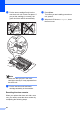

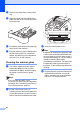
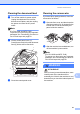
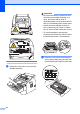
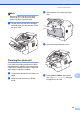
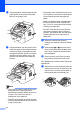
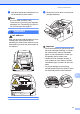
Table Of Contents
- Basic User’s Guide FAX-2840/FAX-2950/MFC-7240/MFC-7290
- User’s Guides and where do I find them?
- Download optional software from the Brother Solutions Center (FAX-2840 users only)
- Table of Contents
- 1 General information
- 2 Loading paper
- 3 Loading documents
- 4 Sending a fax
- 5 Receiving a fax
- 6 Using PC-FAX (For FAX-2950, MFC-7240 and MFC-7290)
- 7 Telephone and external devices
- Voice operations
- Telephone line services
- Telephone Service for Australia
- Telephone Service for New Zealand
- Telephone Service for Some Countries
- Connecting an external TAD
- External and extension telephones
- 8 Dialling and storing numbers
- 9 Making copies
- 10 How to print from a computer (For FAX-2950, MFC-7240 and MFC-7290)
- 11 How to scan to a computer (For FAX-2950, MFC-7240 and MFC-7290)
- A Routine maintenance
- B Troubleshooting
- C Menu and features
- D Specifications
- Index

Routine maintenance
65
A
Cleaning the machine A
Clean the outside and inside of the machine
regularly with a dry, lint-free cloth. When you
replace the toner cartridge or the drum unit,
make sure that you clean the inside of the
machine. If printed pages are stained with
toner, clean the inside of the machine with a
dry, lint-free cloth.
WARNING
DO NOT use flammable substances, any
type of spray, or an organic solvent/liquid
containing alcohol or ammonia to clean the
inside or outside of the machine. Doing so
could cause a fire. Instead, use only a dry,
lint-free cloth.
(See Product Safety Guide: General
precautions.)
Be careful not to inhale toner.
Important
Use neutral detergents. Cleaning with
volatile liquids such as thinner or benzine
will damage the surface of the machine.
Cleaning the outside of the
machine A
a Turn off the machine. Unplug the
telephone line cord first, disconnect all
cables, and then unplug the power cord
from the electrical socket.
Note
(For FAX-2840 and MFC-7240)
To prevent you from losing any important
messages, see Transferring your faxes or
Fax Journal report uu page 83.
b Pull the paper tray completely out of the
machine.
c Wipe the outside of the machine with a
dry, lint-free soft cloth to remove dust.