
User`s guide

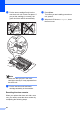

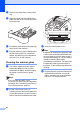
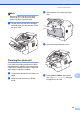
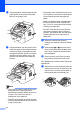
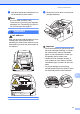
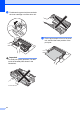
Table Of Contents
- Basic User’s Guide FAX-2840/FAX-2950/MFC-7240/MFC-7290
- User’s Guides and where do I find them?
- Download optional software from the Brother Solutions Center (FAX-2840 users only)
- Table of Contents
- 1 General information
- 2 Loading paper
- 3 Loading documents
- 4 Sending a fax
- 5 Receiving a fax
- 6 Using PC-FAX (For FAX-2950, MFC-7240 and MFC-7290)
- 7 Telephone and external devices
- Voice operations
- Telephone line services
- Telephone Service for Australia
- Telephone Service for New Zealand
- Telephone Service for Some Countries
- Connecting an external TAD
- External and extension telephones
- 8 Dialling and storing numbers
- 9 Making copies
- 10 How to print from a computer (For FAX-2950, MFC-7240 and MFC-7290)
- 11 How to scan to a computer (For FAX-2950, MFC-7240 and MFC-7290)
- A Routine maintenance
- B Troubleshooting
- C Menu and features
- D Specifications
- Index

64
f Put the toner cartridge firmly into the
new drum unit until it locks into place. If
you put the cartridge in correctly, the
green lock lever will lift automatically.
Note
Make sure that you put in the toner
cartridge correctly or it may separate from
the drum unit.
g Put the new drum unit and toner
cartridge assembly in the machine.
Resetting the drum counter A
When you replace the drum unit with a new
one, you need to reset the drum counter by
completing the following steps:
a Press Clear.
To confirm you are installing a new drum
unit, press 1.
b When the LCD shows Accepted, close
the front cover.