
User`s guide

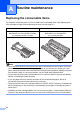


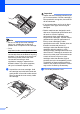


Table Of Contents
- Basic User’s Guide FAX-2840/FAX-2950/MFC-7240/MFC-7290
- User’s Guides and where do I find them?
- Download optional software from the Brother Solutions Center (FAX-2840 users only)
- Table of Contents
- 1 General information
- 2 Loading paper
- 3 Loading documents
- 4 Sending a fax
- 5 Receiving a fax
- 6 Using PC-FAX (For FAX-2950, MFC-7240 and MFC-7290)
- 7 Telephone and external devices
- Voice operations
- Telephone line services
- Telephone Service for Australia
- Telephone Service for New Zealand
- Telephone Service for Some Countries
- Connecting an external TAD
- External and extension telephones
- 8 Dialling and storing numbers
- 9 Making copies
- 10 How to print from a computer (For FAX-2950, MFC-7240 and MFC-7290)
- 11 How to scan to a computer (For FAX-2950, MFC-7240 and MFC-7290)
- A Routine maintenance
- B Troubleshooting
- C Menu and features
- D Specifications
- Index

60
h Clean the corona wire inside the drum
unit by gently sliding the green tab from
left to right and right to left several times.
Note
Be sure to return the tab to the home
position (a) (1). If you do not, printed
pages may have a vertical stripe.
i Put the drum unit and toner cartridge
assembly back into the machine. Close
the front cover.
Note
After replacing the toner cartridge, DO
NOT turn off the machine’s power switch
or open the front cover until the LCD
clears the Please Wait message and
returns to Ready mode.
Replacing the drum unit A
Model name: (For Asia) DR-2255
(For Oceania) DR-2225
A new drum unit can print approximately
12,000 A4 or Letter size single-sided pages.
Important
For best performance, use only a genuine
Brother Original drum unit and genuine
Brother Original toner units. Printing with a
third-party drum unit or toner unit may
reduce not only the print quality but also
the quality and life of the machine itself.
Warranty coverage may not apply to
problems caused by the use of a third-
party drum or toner unit.
Drum Error A
Drum Error
The corona wire has become dirty. Clean the
corona wire in the drum unit. (See Cleaning
the corona wire uu page 67.)
If you cleaned the corona wire and Drum
Error was not cleared, replace the drum unit
with a new one.
Replace Drum A
Replace Drum
Please replace the drum unit with a new one.
We recommend a genuine Brother Original
drum unit be installed at this time.
1