
User`s guide

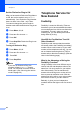


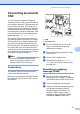
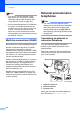

Table Of Contents
- Basic User’s Guide FAX-2840/FAX-2950/MFC-7240/MFC-7290
- User’s Guides and where do I find them?
- Download optional software from the Brother Solutions Center (FAX-2840 users only)
- Table of Contents
- 1 General information
- 2 Loading paper
- 3 Loading documents
- 4 Sending a fax
- 5 Receiving a fax
- 6 Using PC-FAX (For FAX-2950, MFC-7240 and MFC-7290)
- 7 Telephone and external devices
- Voice operations
- Telephone line services
- Telephone Service for Australia
- Telephone Service for New Zealand
- Telephone Service for Some Countries
- Connecting an external TAD
- External and extension telephones
- 8 Dialling and storing numbers
- 9 Making copies
- 10 How to print from a computer (For FAX-2950, MFC-7240 and MFC-7290)
- 11 How to scan to a computer (For FAX-2950, MFC-7240 and MFC-7290)
- A Routine maintenance
- B Troubleshooting
- C Menu and features
- D Specifications
- Index

41
8
8
How to dial 8
You can dial in any of the following ways.
Manual dialling 8
Use the dial pad to enter all the digits of the
telephone or fax number.
One Touch dialling 8
Press the One Touch key that stores the
number you want to call. (See Storing
One Touch Dial numbers uu page 42.)
To dial One Touch numbers 12 to 22, hold
down Shift and then press the One Touch
key.
Speed Dialling 8
Press (Address Book) and enter the
three digit Speed Dial number. (See Storing
Speed Dial numbers uu page 43.)
Note
If the LCD shows Register Now? when
you enter a One Touch or a Speed Dial
number, it means that a number is not
stored there.
Dialling and storing numbers 8
Three-digit number