
User`s guide


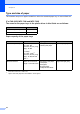


Table Of Contents
- Basic User’s Guide FAX-2840/FAX-2950/MFC-7240/MFC-7290
- User’s Guides and where do I find them?
- Download optional software from the Brother Solutions Center (FAX-2840 users only)
- Table of Contents
- 1 General information
- 2 Loading paper
- 3 Loading documents
- 4 Sending a fax
- 5 Receiving a fax
- 6 Using PC-FAX (For FAX-2950, MFC-7240 and MFC-7290)
- 7 Telephone and external devices
- Voice operations
- Telephone line services
- Telephone Service for Australia
- Telephone Service for New Zealand
- Telephone Service for Some Countries
- Connecting an external TAD
- External and extension telephones
- 8 Dialling and storing numbers
- 9 Making copies
- 10 How to print from a computer (For FAX-2950, MFC-7240 and MFC-7290)
- 11 How to scan to a computer (For FAX-2950, MFC-7240 and MFC-7290)
- A Routine maintenance
- B Troubleshooting
- C Menu and features
- D Specifications
- Index

Loading paper
19
2
Recommended paper specifications 2
The following paper specifications are suitable for this machine.
Only use paper made for plain paper copying.
Only use paper that is 75 to 90 gsm.
Only use long grain paper with a neutral Ph value, and a moisture content of approx. 5%.
This machine can use recycled paper that meets DIN 19309 specifications.
Basis weight 75-90 gsm
Thickness 80-110 m
Roughness Higher than 20 sec.
Stiffness
90-150 cm
3
/100
Grain direction Long grain
Volume resistivity
10e
9
-10e
11
ohm
Surface resistivity
10e
9
-10e
12
ohm-cm
Filler
CaCO
3
(Neutral)
Ash content Below 23 wt%
Brightness Higher than 80%
Opacity Higher than 85%