
User`s guide


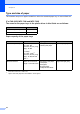


Table Of Contents
- Basic User’s Guide FAX-2840/FAX-2950/MFC-7240/MFC-7290
- User’s Guides and where do I find them?
- Download optional software from the Brother Solutions Center (FAX-2840 users only)
- Table of Contents
- 1 General information
- 2 Loading paper
- 3 Loading documents
- 4 Sending a fax
- 5 Receiving a fax
- 6 Using PC-FAX (For FAX-2950, MFC-7240 and MFC-7290)
- 7 Telephone and external devices
- Voice operations
- Telephone line services
- Telephone Service for Australia
- Telephone Service for New Zealand
- Telephone Service for Some Countries
- Connecting an external TAD
- External and extension telephones
- 8 Dialling and storing numbers
- 9 Making copies
- 10 How to print from a computer (For FAX-2950, MFC-7240 and MFC-7290)
- 11 How to scan to a computer (For FAX-2950, MFC-7240 and MFC-7290)
- A Routine maintenance
- B Troubleshooting
- C Menu and features
- D Specifications
- Index

Chapter 2
16
Unscannable and unprintable areas 2
The figures below show the maximum unscannable and unprintable areas. The unscannable and
unprintable areas may vary depending on the paper size you are using.
Usage Document
Size
Top (1)
Bottom (3)
Left (2)
Right (4)
Fax (Send) Letter 3 mm 4 mm
Legal
2
3 mm 4 mm
A4 3 mm 1 mm
Copy
*a single copy
or a 1 in 1 copy
Letter 3 mm 4 mm
Legal
2
3 mm 4 mm
A4 3 mm 3 mm
Scan
1
Letter 3 mm 3 mm
Legal
2
3 mm 3 mm
A4 3 mm 3 mm
Print
1
Letter 4.23 mm 6.35 mm
Legal
2
4.23 mm 6.35 mm
A4 4.23 mm 6.01 mm
1
For FAX-2950, MFC-7240 and MFC-7290
2
For Asia
1
3
24