
User`s guide


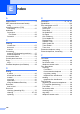


Table Of Contents
- Basic User’s Guide FAX-2840/FAX-2950/MFC-7240/MFC-7290
- User’s Guides and where do I find them?
- Download optional software from the Brother Solutions Center (FAX-2840 users only)
- Table of Contents
- 1 General information
- 2 Loading paper
- 3 Loading documents
- 4 Sending a fax
- 5 Receiving a fax
- 6 Using PC-FAX (For FAX-2950, MFC-7240 and MFC-7290)
- 7 Telephone and external devices
- Voice operations
- Telephone line services
- Telephone Service for Australia
- Telephone Service for New Zealand
- Telephone Service for Some Countries
- Connecting an external TAD
- External and extension telephones
- 8 Dialling and storing numbers
- 9 Making copies
- 10 How to print from a computer (For FAX-2950, MFC-7240 and MFC-7290)
- 11 How to scan to a computer (For FAX-2950, MFC-7240 and MFC-7290)
- A Routine maintenance
- B Troubleshooting
- C Menu and features
- D Specifications
- Index

134
R
Redial/Pause key .....................................42
Replacing
drum unit
...............................................60
toner cartridge
.......................................55
Reports
Transmission Verification
......................25
Resolution
copy
....................................................127
fax (standard, fine, superfine, photo)
..126
print
.....................................................128
scan
....................................................127
Resolution key
...........................................8
Ring delay, setting
...................................28
S
Safety Instructions ......................................i
Serial number
how to find...............See inside front cover
Speed dial
changing
...............................................43
setting up
..............................................43
using
.....................................................41
T
TAD (telephone answering device),
external
.................................................... 27
connecting
............................................ 37
recording OGM
..................................... 37
Telephone line
connections
.......................................... 37
difficulties
.............................................. 93
interference
........................................ 100
multi-line (PBX)
.................................... 38
Text, entering
........................................ 123
Toner cartridge
replacing
............................................... 55
Troubleshooting
....................................... 76
document jam
....................................... 84
error messages on LCD
....................... 78
if you are having difficulty
copy quality
....................................... 96
incoming calls
.................................... 96
paper handling
.................................. 98
print quality
........................................ 99
printing
........................................93, 97
receiving faxes
.................................. 94
scanning
............................................ 98
sending faxes
.................................... 95
software
............................................. 98
telephone line
.................................. 100
maintenance messages on LCD
.......... 78
paper jam
.................................84, 85, 88
V
VoIP ....................................................... 100
Volume, setting
beeper
.................................................... 9
ring
......................................................... 9
speaker
................................................... 9