
User`s guide
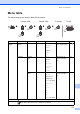
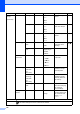


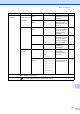
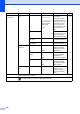


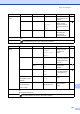
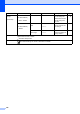
Table Of Contents
- Basic User’s Guide FAX-2840/FAX-2950/MFC-7240/MFC-7290
- User’s Guides and where do I find them?
- Download optional software from the Brother Solutions Center (FAX-2840 users only)
- Table of Contents
- 1 General information
- 2 Loading paper
- 3 Loading documents
- 4 Sending a fax
- 5 Receiving a fax
- 6 Using PC-FAX (For FAX-2950, MFC-7240 and MFC-7290)
- 7 Telephone and external devices
- Voice operations
- Telephone line services
- Telephone Service for Australia
- Telephone Service for New Zealand
- Telephone Service for Some Countries
- Connecting an external TAD
- External and extension telephones
- 8 Dialling and storing numbers
- 9 Making copies
- 10 How to print from a computer (For FAX-2950, MFC-7240 and MFC-7290)
- 11 How to scan to a computer (For FAX-2950, MFC-7240 and MFC-7290)
- A Routine maintenance
- B Troubleshooting
- C Menu and features
- D Specifications
- Index

118
2.Fax
(Continued)
5.Remote Fax
Opt
1.
Forward/Store
Fax Forward
Fax Storage
PC Fax Receive
(For FAX-2950,
MFC-7240 and
MFC-7290)
Off*
Sets the machine to
forward fax
messages, to store
incoming faxes in the
memory (so you can
retrieve them while
you are away from
your machine), or to
send faxes to your
PC.
See .
(Backup Print) If you choose
Fax Forward, you can
turn on the safety
feature Backup Print.
2.Remote
Access
---l Sets your own code
for Remote Retrieval.
3.Print
Document
— Prints incoming faxes
stored in the memory.
6.Dial
Restrict.
1.Dial Pad Enter # twice
On
Off*
You can set the
machine to restrict
dialling when using
the dial pad.
2.One Touch
Dial
Enter # twice
On
Off*
You can set the
machine to restrict
the dialling of
One
Touch numbers.
3.Speed Dial Enter # twice
On
Off*
You can set the
machine to restrict
the dialling of Speed
Dial numbers.
7.Remaining
Jobs
— — You can check which
jobs are in the
memory and lets you
cancel scheduled
jobs.
Level 1 Level 2 Level 3 Options Descriptions Page
See Advanced User’s Guide.
The default settings are shown in Bold with an asterisk.