
User Manual
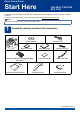
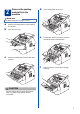


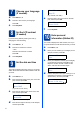

Table Of Contents
- Quick Setup Guide FAX-2890/FAX-2990/MFC-7290
- Start Here
- 1 Unpack the machine and check the components
- 2 Remove the packing material from the machine
- 3 Attach the ADF Document Output Support
- 4 Install the Handset
- 5 Load paper in the paper tray
- 6 Connect the power cord and telephone line
- 7 Choose your language (If needed)
- 8 Set the LCD contrast (if needed)
- 9 Set the date and time
- 10 Enter personal information (Station ID)
- 11 Fax Transmission Report
- 12 Set tone or pulse dialling mode
- 13 Set the telephone line compatibility
- 14 Dial Prefix
- 15 Choose your Operating System
- For Windows® Users (Windows® XP/XP Professional x64 Edition/Windows Vista®/Windows® 7)
- For Macintosh Users (Mac OS X 10.5.8 - 10.7.x)
- Other Information
- Consumables
- Start Here

10
14
Dial Prefix
The dial prefix setting will automatically dial a
predefined number before every fax number you dial.
For example: If your phone system requires a 9 to dial
an outside number this setting will automatically dial 9
for every fax you send.
a Press Menu, 0, 5.
b Enter the prefix number (up to 5 digits) on the
dial pad, and then press OK.
c Press Stop/Exit.
Note
• You can use the numbers 0 to 9, #, l and !.
(Press Hook/Hold to display “!”.)
• You cannot use ! with any other numbers or
characters.
• If your telephone system requires a timed break
recall (hookflash), press Hook/Hold to enter the
break.
• If the pulse dialling mode is on, # and l are not
available to use.