
User Manual
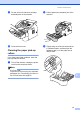


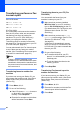
Table Of Contents
- Basic User’s Guide FAX-2840/FAX-2950
- User’s Guides and where do I find them?
- Download optional software from the Brother Solutions Center (FAX-2840 users only)
- Table of Contents
- 1 General information
- 2 Loading paper
- 3 Loading documents
- 4 Sending a fax
- 5 Receiving a fax
- 6 Using PC-FAX (For FAX-2950)
- 7 Telephone and external devices
- 8 Dialling and storing numbers
- 9 Making copies
- 10 How to print from a computer (For FAX-2950)
- 11 How to scan to a computer (For FAX-2950)
- A Routine maintenance
- B Troubleshooting
- C Menu and features
- D Specifications
- Index

Routine maintenance
73
A
i Put the drum unit and toner cartridge
assembly back in the machine.
j Close the front cover.
Cleaning the paper pick-up
rollers A
If you have paper feed problems, clean the
pick-up rollers as follows:
a Turn off the machine. Unplug the power
cord from the electrical socket.
Note
(For FAX-2840)
To prevent you from losing any important
messages, see Transferring your faxes or
Fax Journal report uu page 82.
b Pull the paper tray completely out of the
machine.
c Tightly wring out a lint-free cloth soaked
in lukewarm water, and then wipe the
separator pad (1) on the paper tray to
remove dust.
1