
User Manual


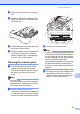


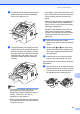
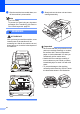
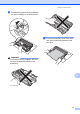
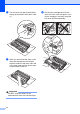
Table Of Contents
- Basic User’s Guide FAX-2840/FAX-2950
- User’s Guides and where do I find them?
- Download optional software from the Brother Solutions Center (FAX-2840 users only)
- Table of Contents
- 1 General information
- 2 Loading paper
- 3 Loading documents
- 4 Sending a fax
- 5 Receiving a fax
- 6 Using PC-FAX (For FAX-2950)
- 7 Telephone and external devices
- 8 Dialling and storing numbers
- 9 Making copies
- 10 How to print from a computer (For FAX-2950)
- 11 How to scan to a computer (For FAX-2950)
- A Routine maintenance
- B Troubleshooting
- C Menu and features
- D Specifications
- Index

72
f Turn the drum unit gear by hand while
looking at the surface of the drum roller
(1).
g When you have found the mark on the
drum that matches the print sample,
wipe the surface of the drum roller with
a dry cotton swab until the dust or glue
on the surface comes off.
Important
DO NOT clean the surface of the
photosensitive drum with a sharp object.
h Put the toner cartridge back into the
drum unit until it locks into place. If you
put the cartridge in correctly, the green
lock lever will lift automatically.
1