
User Manual




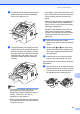
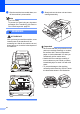
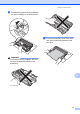
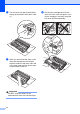
Table Of Contents
- Basic User’s Guide FAX-2840/FAX-2950
- User’s Guides and where do I find them?
- Download optional software from the Brother Solutions Center (FAX-2840 users only)
- Table of Contents
- 1 General information
- 2 Loading paper
- 3 Loading documents
- 4 Sending a fax
- 5 Receiving a fax
- 6 Using PC-FAX (For FAX-2950)
- 7 Telephone and external devices
- 8 Dialling and storing numbers
- 9 Making copies
- 10 How to print from a computer (For FAX-2950)
- 11 How to scan to a computer (For FAX-2950)
- A Routine maintenance
- B Troubleshooting
- C Menu and features
- D Specifications
- Index

Routine maintenance
67
A
c Slowly take out the drum unit and toner
cartridge assembly.
Important
• We recommend that you place the drum
unit and toner cartridge assembly on a
clean, flat surface with a sheet of
disposable paper or cloth underneath it in
case you accidentally spill or scatter toner.
• Handle the toner cartridge carefully. If
toner scatters on your hands or clothes,
wipe or wash it off with cold water at once.
• To prevent damage to the machine
caused by static electricity, DO NOT touch
the electrodes shown in the illustration.
d Clean the corona wire inside the drum
unit by gently sliding the green tab from
right to left and left to right several times.
1