
User Manual


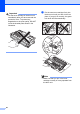

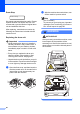


Table Of Contents
- Basic User’s Guide FAX-2840/FAX-2950
- User’s Guides and where do I find them?
- Download optional software from the Brother Solutions Center (FAX-2840 users only)
- Table of Contents
- 1 General information
- 2 Loading paper
- 3 Loading documents
- 4 Sending a fax
- 5 Receiving a fax
- 6 Using PC-FAX (For FAX-2950)
- 7 Telephone and external devices
- 8 Dialling and storing numbers
- 9 Making copies
- 10 How to print from a computer (For FAX-2950)
- 11 How to scan to a computer (For FAX-2950)
- A Routine maintenance
- B Troubleshooting
- C Menu and features
- D Specifications
- Index

58
Important
Put the toner cartridge in the drum unit
immediately after you have removed the
protective cover. To prevent any
degradation to the print quality, DO NOT
touch the shaded parts shown in the
illustration.
g Put the new toner cartridge firmly into
the drum unit until you hear it lock into
place. If you put it in correctly, the green
lock lever will lift automatically.
Note
Make sure that you put in the toner
cartridge correctly or it may separate from
the drum unit.