
User Manual


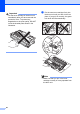

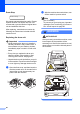


Table Of Contents
- Basic User’s Guide FAX-2840/FAX-2950
- User’s Guides and where do I find them?
- Download optional software from the Brother Solutions Center (FAX-2840 users only)
- Table of Contents
- 1 General information
- 2 Loading paper
- 3 Loading documents
- 4 Sending a fax
- 5 Receiving a fax
- 6 Using PC-FAX (For FAX-2950)
- 7 Telephone and external devices
- 8 Dialling and storing numbers
- 9 Making copies
- 10 How to print from a computer (For FAX-2950)
- 11 How to scan to a computer (For FAX-2950)
- A Routine maintenance
- B Troubleshooting
- C Menu and features
- D Specifications
- Index

56
• To prevent damage to the machine
caused by static electricity, DO NOT touch
the electrodes shown in the illustration.
d Push down the green lock lever and take
the toner cartridge out of the drum unit.
WARNING
DO NOT put a toner cartridge or a toner
cartridge and drum unit assembly into a fire.
It could explode, resulting in injuries.
DO NOT use flammable substances, any
type of spray, or an organic solvent/liquid
containing alcohol or ammonia to clean the
inside or outside of the machine. Doing so
could cause a fire. Instead, use only a dry,
lint-free cloth.
(See Product Safety Guide: General
precautions.)
Be careful not to inhale toner.
Important
To avoid print quality problems, DO NOT
touch the shaded parts shown in the
illustrations.