
User Manual
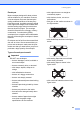

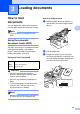

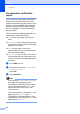

Table Of Contents
- Basic User’s Guide FAX-2840/FAX-2950
- User’s Guides and where do I find them?
- Download optional software from the Brother Solutions Center (FAX-2840 users only)
- Table of Contents
- 1 General information
- 2 Loading paper
- 3 Loading documents
- 4 Sending a fax
- 5 Receiving a fax
- 6 Using PC-FAX (For FAX-2950)
- 7 Telephone and external devices
- 8 Dialling and storing numbers
- 9 Making copies
- 10 How to print from a computer (For FAX-2950)
- 11 How to scan to a computer (For FAX-2950)
- A Routine maintenance
- B Troubleshooting
- C Menu and features
- D Specifications
- Index

25
3
3
How to load
documents
3
You can send a fax, make copies and scan
from the ADF (Automatic Document Feeder).
Note
The scan feature is available for FAX-
2950.
Using the automatic
document feeder (ADF) 3
The ADF can hold up to 20 pages and feeds
each sheet individually. Use standard
80 g/m
2
paper and always fan the pages
before putting them in the ADF.
Document Sizes Supported 3
Important
• DO NOT use paper that is curled,
wrinkled, folded, ripped, stapled, paper-
clipped, glued or taped.
• DO NOT use cardboard, newspaper or
fabric.
• To avoid damaging your machine while
using the ADF, DO NOT pull on the
document while it is feeding.
Note
Make sure documents with correction fluid
or written with ink are completely dry.
How to load documents 3
a Unfold the ADF document support (1)
and the ADF document output support
flap (2).
b Fan the pages well.
c Stagger the pages of your document
face down top edge first, in the ADF until
the LCD display message changes and
you feel it touch the feed rollers.
Loading documents 3
Length: 147.3 to 355.6 mm
Width: 147.3 to 215.9 mm
Weight:
64 to 90 g/m
2
1
2
1