
User Manual




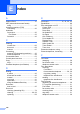


Table Of Contents
- Basic User’s Guide FAX-2840/FAX-2950
- User’s Guides and where do I find them?
- Download optional software from the Brother Solutions Center (FAX-2840 users only)
- Table of Contents
- 1 General information
- 2 Loading paper
- 3 Loading documents
- 4 Sending a fax
- 5 Receiving a fax
- 6 Using PC-FAX (For FAX-2950)
- 7 Telephone and external devices
- 8 Dialling and storing numbers
- 9 Making copies
- 10 How to print from a computer (For FAX-2950)
- 11 How to scan to a computer (For FAX-2950)
- A Routine maintenance
- B Troubleshooting
- C Menu and features
- D Specifications
- Index

133
E
H
HELP
LCD messages
...................................111
Menu Table
.........................................112
L
Labels ...................................14, 19, 20, 24
LCD (liquid crystal display)
............. 10, 111
M
Machine information
checking remaining life of parts
............74
how to reset the machine
....................110
page counts
..........................................74
reset functions
....................................109
serial number
......................................109
Maintenance, routine
checking remaining life of parts
............74
replacing
drum unit
............................................59
toner cartridge
....................................54
Manual
dialling
...................................................41
receive
..................................................30
Menu Table
............................................112
Mode, entering
copy
......................................................45
fax
.........................................................27
Multi-line connections (PBX)
....................37
O
One touch
changing
...............................................43
setting up
..............................................42
using
.....................................................41
Out of Memory message
..........................80
P
Paper ....................................................... 19
how to load
........................................... 12
in manual feed slot
............................ 14
in paper tray
...................................... 12
recommended
................................19, 20
size
....................................................... 20
tray capacity
......................................... 20
type
...................................................... 20
Print
difficulties
....................................... 92, 96
quality
................................................... 98
specifications
...................................... 128
Print quality
............................................ 100
Programming your machine
.................. 111
Q
Quality
printing
................................................. 98
Quick dial
................................................. 42
group dial
changing
............................................ 43
one touch dial
changing
............................................ 43
setting up
........................................... 42
using
.................................................. 41
Search
.................................................. 42
speed dial
changing
............................................ 43
setting up
........................................... 43
using
.................................................. 41