
User Manual


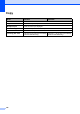

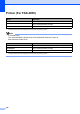


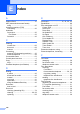
Table Of Contents
- Basic User’s Guide FAX-2840/FAX-2950
- User’s Guides and where do I find them?
- Download optional software from the Brother Solutions Center (FAX-2840 users only)
- Table of Contents
- 1 General information
- 2 Loading paper
- 3 Loading documents
- 4 Sending a fax
- 5 Receiving a fax
- 6 Using PC-FAX (For FAX-2950)
- 7 Telephone and external devices
- 8 Dialling and storing numbers
- 9 Making copies
- 10 How to print from a computer (For FAX-2950)
- 11 How to scan to a computer (For FAX-2950)
- A Routine maintenance
- B Troubleshooting
- C Menu and features
- D Specifications
- Index

126
Copy D
Model FAX-2840 FAX-2950
Colour/Monochrome Monochrome
Copy Width Max. 204 mm (A4 size)
Multiple Copies Stacks or Sorts up to 99 pages
Reduce/Enlarge 25% to 400% (in increments of 1%)
Resolution Up to 300 600 dpi
First Copy Out Time Less than 12 seconds (from the Ready
mode and standard tray)
Less than 11 seconds (from the Ready
mode and standard tray)