
User Manual


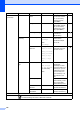
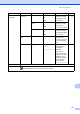

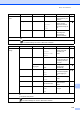
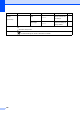
Table Of Contents
- Basic User’s Guide FAX-2840/FAX-2950
- User’s Guides and where do I find them?
- Download optional software from the Brother Solutions Center (FAX-2840 users only)
- Table of Contents
- 1 General information
- 2 Loading paper
- 3 Loading documents
- 4 Sending a fax
- 5 Receiving a fax
- 6 Using PC-FAX (For FAX-2950)
- 7 Telephone and external devices
- 8 Dialling and storing numbers
- 9 Making copies
- 10 How to print from a computer (For FAX-2950)
- 11 How to scan to a computer (For FAX-2950)
- A Routine maintenance
- B Troubleshooting
- C Menu and features
- D Specifications
- Index

118
Level 1 Level 2 Level 3 Options Descriptions Page
3.Copy 1.Quality — Auto*
Text
Photo
Graph
You can choose the
Copy resolution for
your type of
document.
See .
2.Brightness — -nnnno+
-nnnon+
-nnonn+*
-nonnn+
-onnnn+
Adjust the brightness
for copies.
3.Contrast — -nnnno+
-nnnon+
-nnonn+*
-nonnn+
-onnnn+
Adjusts the contrast
for copies.
See Advanced User’s Guide.
The default settings are shown in Bold with an asterisk.
Level 1 Level 2 Level 3 Options Descriptions Page
4.Print
Reports
1.XMIT Verify 1.View on LCD — You can view the
Transmission
Verification Report for
your last 200
outgoing faxes and
print the last report.
See .
2.Print Report —
2.Tel Index
List
1.Numeric — Lists names and
numbers stored in the
One Touch and
Speed Dial memory,
in numerical or
alphabetical order.
2.Alphabetic —
3.Fax Journal — — Lists information
about your last 200
incoming and
outgoing faxes. (TX
means Transmit. RX
means Receive.)
4.User
Settings
— — Lists your settings.
See Advanced User’s Guide.
The default settings are shown in Bold with an asterisk.