
User Manual

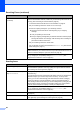


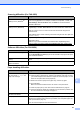

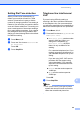
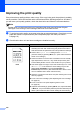

Table Of Contents
- Basic User’s Guide FAX-2840/FAX-2950
- User’s Guides and where do I find them?
- Download optional software from the Brother Solutions Center (FAX-2840 users only)
- Table of Contents
- 1 General information
- 2 Loading paper
- 3 Loading documents
- 4 Sending a fax
- 5 Receiving a fax
- 6 Using PC-FAX (For FAX-2950)
- 7 Telephone and external devices
- 8 Dialling and storing numbers
- 9 Making copies
- 10 How to print from a computer (For FAX-2950)
- 11 How to scan to a computer (For FAX-2950)
- A Routine maintenance
- B Troubleshooting
- C Menu and features
- D Specifications
- Index

Troubleshooting
101
B
Gray background
Make sure that you use paper that meets our specifications. (See
Acceptable paper and other print media uu page 19.)
Check the machine
’s environment. Conditions such as high
temperatures and high humidity can increase the amount of
background shading. (See Product Safety Guide: Choose a safe
location for your product.)
Clean the drum surface. (See Cleaning the drum unit
uu page 68.)
Put in a new toner cartridge. (See Replacing the toner cartridge
uu page 54.)
Put in a new drum unit. (See Replacing the drum unit
uu page 59.)
Ghost
Make sure that you use paper that meets our specifications.
Rough-surfaced paper or thick print media may cause this
problem. (See Acceptable paper and other print media
uu page 19.)
Make sure that you choose the appropriate media type in the
printer driver (for FAX-2950) or in the machine’s Paper Type
menu setting. (See Acceptable paper and other print media
uu page 19 and Software User’s Guide: Basic Tab.)
(For FAX-2950)
Choose Reduce Ghosting mode in the printer driver. (See
Software User’s Guide: Ghost Reduction Setting.)
Put in a new toner cartridge. (See Replacing the toner cartridge
uu page 54.)
Clean the drum surface. (See Cleaning the drum unit
uu page 68.)
Put in a new drum unit. (See Replacing the drum unit
uu page 59.)
The fuser unit may be contaminated. Call Brother Customer
Service or your local Brother dealer.
Toner specks
Make sure that you use paper that meets our specifications.
Rough-surfaced paper may cause the problem. (See Acceptable
paper and other print media uu page 19.)
Clean the corona wire and the drum unit. (See Cleaning the
corona wire uu page 66 and Replacing the drum unit
uu page 59.)
The drum unit may be damaged. Put in a new drum unit. (See
Replacing the drum unit uu page 59.)
The fuser unit may be contaminated. Call Brother Customer
Service or your local Brother dealer.
Examples of poor print quality Recommendation
ABCDEFGH
abcdefghijk
ABCD
abcde
01234
ABCDEFGH
abcdefghijk
ABCD
abcde
01234