
User Manual




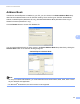
Table Of Contents
- Software User’s Guide
- Applicable models
- Definitions of notes
- Compilation and publication notice
- IMPORTANT NOTE
- Table of Contents
- Section I: Machine operation keys
- Section II: Windows®
- 2 Printing
- 3 Scanning
- Scanning a document using the TWAIN driver
- Scanning a document using the WIA driver
- Scanning a document using the WIA driver (Windows Photo Gallery and Windows Fax and Scan)
- Using Nuance™ PaperPort™ 12SE
- 4 ControlCenter4
- 5 Remote Setup
- 6 Brother PC-FAX Software
- Section III: Apple Macintosh
- 7 Printing and Faxing
- 8 Scanning
- 9 ControlCenter2
- 10 Remote Setup
- Section IV: Using the Scan key
- Index

Brother PC-FAX Software
83
6
Address Book 6
If Outlook or Outlook Express is installed on your PC, you can choose in the Select Address Book drop-
down list which address book to use for PC-FAX sending. There are five types: PC-FAX Address Book,
Outlook, Outlook Express (Windows
®
XP only), Windows Mail Address Book (Windows Vista
®
only) or
Windows Contacts (Windows
®
7 only).
Click the Browse button to choose the database file.
You can use the address book you have chosen in the Select Address Book drop-down list by clicking the
Address Book button in the PC-FAX Sending dialog box.
Outlook Express Address Book
6
Note
• To use your Outlook Address Book, you must select Microsoft
®
Outlook 2000, 2002, 2003, 2007 or 2010
as your default E-mail application.
• For Microsoft
®
Outlook 2010, the 64-bit version is not supported.