
User Manual
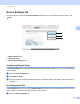

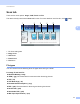

Table Of Contents
- Software User’s Guide
- Applicable models
- Definitions of notes
- Compilation and publication notice
- IMPORTANT NOTE
- Table of Contents
- Section I: Machine operation keys
- Section II: Windows®
- 2 Printing
- 3 Scanning
- Scanning a document using the TWAIN driver
- Scanning a document using the WIA driver
- Scanning a document using the WIA driver (Windows Photo Gallery and Windows Fax and Scan)
- Using Nuance™ PaperPort™ 12SE
- 4 ControlCenter4
- 5 Remote Setup
- 6 Brother PC-FAX Software
- Section III: Apple Macintosh
- 7 Printing and Faxing
- 8 Scanning
- 9 ControlCenter2
- 10 Remote Setup
- Section IV: Using the Scan key
- Index

ControlCenter4
61
4
Scan tab 4
There are four scan options: Image, OCR, E-mail and File.
This section briefly introduces the Scan tab function. For more details of each function, click (Help).
1 PC Scan setting area
2 Image button
3 OCR button
4 E-mail button
5 File button
File types 4
You can choose from the following list of file types when saving to a folder.
For Image, E-mail and File
4
Windows Bitmap (*.bmp)
JPEG (*.jpg) -Recommended for most users when Scanning pictures.
TIFF (*.tif)
TIFF Multi-Page (*.tif)
Portable Network Graphics (*.png)
PDF (*.pdf) -Recommended for Scanning and sharing documents.
Secure PDF (*.pdf)
Searchable PDF (*.pdf)
XML Paper Specification (*.xps)