
User Manual
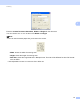


Table Of Contents
- Software User’s Guide
- Applicable models
- Definitions of notes
- Compilation and publication notice
- IMPORTANT NOTE
- Table of Contents
- Section I: Machine operation keys
- Section II: Windows®
- 2 Printing
- 3 Scanning
- Scanning a document using the TWAIN driver
- Scanning a document using the WIA driver
- Scanning a document using the WIA driver (Windows Photo Gallery and Windows Fax and Scan)
- Using Nuance™ PaperPort™ 12SE
- 4 ControlCenter4
- 5 Remote Setup
- 6 Brother PC-FAX Software
- Section III: Apple Macintosh
- 7 Printing and Faxing
- 8 Scanning
- 9 ControlCenter2
- 10 Remote Setup
- Section IV: Using the Scan key
- Index

Scanning
35
3
Enter the Custom Document Size Name, Width and Height for the document.
You can choose ‘mm’ or ‘inch’ as the unit for Width and Height.
Note
• You can see the actual paper size you chose on the screen.
• Width: shows the width of scanning area.
• Height: shows the height of scanning area.
• Data Size: shows the rough data size in Bitmap format. The size will be different for other file formats
such as JPEG.
• User adjustable from 8.9 x 8.9 mm to 215.9 x 355.6 mm.