
User Manual
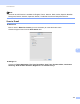
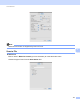
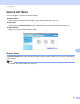
Table Of Contents
- Software User’s Guide
- Applicable models
- Definitions of notes
- Compilation and publication notice
- IMPORTANT NOTE
- Table of Contents
- Section I: Machine operation keys
- Section II: Windows®
- 2 Printing
- 3 Scanning
- Scanning a document using the TWAIN driver
- Scanning a document using the WIA driver
- Scanning a document using the WIA driver (Windows Photo Gallery and Windows Fax and Scan)
- Using Nuance™ PaperPort™ 12SE
- 4 ControlCenter4
- 5 Remote Setup
- 6 Brother PC-FAX Software
- Section III: Apple Macintosh
- 7 Printing and Faxing
- 8 Scanning
- 9 ControlCenter2
- 10 Remote Setup
- Section IV: Using the Scan key
- Index

ControlCenter2
141
9
DEVICE SETTINGS 9
You can configure or check the machine settings.
Remote Setup
Lets you open the Remote Setup Program. (See Remote Setup uu page 144.)
Quick-Dial
Lets you open the Address Book window of Remote Setup. (See Remote Setup uu page 144.)
Status Monitor
Allows you to open the Status Monitor Utility.
Remote Setup 9
The Remote Setup button opens the Remote Setup Program window; allowing you to configure the settings
of the machine.
Note
For details, see Remote Setup uu page 144.