
User Manual
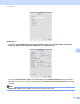
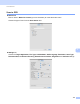
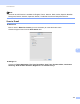
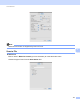
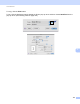
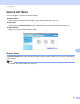
Table Of Contents
- Software User’s Guide
- Applicable models
- Definitions of notes
- Compilation and publication notice
- IMPORTANT NOTE
- Table of Contents
- Section I: Machine operation keys
- Section II: Windows®
- 2 Printing
- 3 Scanning
- Scanning a document using the TWAIN driver
- Scanning a document using the WIA driver
- Scanning a document using the WIA driver (Windows Photo Gallery and Windows Fax and Scan)
- Using Nuance™ PaperPort™ 12SE
- 4 ControlCenter4
- 5 Remote Setup
- 6 Brother PC-FAX Software
- Section III: Apple Macintosh
- 7 Printing and Faxing
- 8 Scanning
- 9 ControlCenter2
- 10 Remote Setup
- Section IV: Using the Scan key
- Index

ControlCenter2
134
9
Settings tab
Choose the Target Application, File Type, Resolution, Scan Type, Document Size, Continuous
Scanning, Show Scanner Interface, Brightness and Contrast settings.
If you choose Secure PDF (*.pdf) from the File Type list, the Set PDF Password dialog box appears
(Mac OS X 10.6.x to 10.7.x). Enter your password in the Password and Re-type Password box and then
click OK.
Note
Secure PDF (*.pdf) is also available for Scan to E-mail and Scan to File.