
User Manual
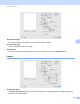
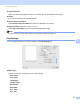


Table Of Contents
- Software User’s Guide
- Applicable models
- Definitions of notes
- Compilation and publication notice
- IMPORTANT NOTE
- Table of Contents
- Section I: Machine operation keys
- Section II: Windows®
- 2 Printing
- 3 Scanning
- Scanning a document using the TWAIN driver
- Scanning a document using the WIA driver
- Scanning a document using the WIA driver (Windows Photo Gallery and Windows Fax and Scan)
- Using Nuance™ PaperPort™ 12SE
- 4 ControlCenter4
- 5 Remote Setup
- 6 Brother PC-FAX Software
- Section III: Apple Macintosh
- 7 Printing and Faxing
- 8 Scanning
- 9 ControlCenter2
- 10 Remote Setup
- Section IV: Using the Scan key
- Index

Printing and Faxing
99
7
Layout Direction
When you specify the pages per sheet, you can also specify the direction of the layout.
Border
If you want to add a border, use this function.
Reverse Page Orientation
Check Reverse Page Orientation to reverse the data from up to down.
Flip horizontally (Mac OS X 10.6.x to 10.7.x)
Check Flip horizontally to print as a reflection flipped left-to-right.
Note
If you want to do manual duplex printing, see Duplex Printing uu page 101.
Print Settings 7
You can change settings by choosing a setting in the Print Settings list:
Media Type
You can change the media type to one of the following:
• Plain Paper
• Thin Paper
• Thick Paper
• Thicker Paper
• Bond Paper
• Envelopes
• Env. Thick
• Env. Thin