
User Manual


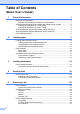
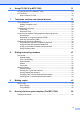


Table Of Contents
- Basic User’s Guide FAX-2840/MFC-7290
- User’s Guides and where do I find them?
- Download optional software from the Brother Solutions Center (FAX-2840 users)
- Table of Contents
- 1 General information
- 2 Loading paper
- 3 Loading documents
- 4 Sending a fax
- 5 Receiving a fax
- 6 Using PC-FAX (For MFC-7290)
- 7 Telephone services and external devices
- 8 Dialing and storing numbers
- 9 Making copies
- 10 How to print from your computer (For MFC-7290)
- 11 How to scan to a computer (MFC-7290 only)
- A Routine maintenance
- B Troubleshooting
- C Menu and features
- D Specifications
- E Appendix
- Index

iv
11 How to scan to a computer (MFC-7290 only) 47
Before scanning...................................................................................................47
Scanning a document as a PDF file using ControlCenter4 (Windows
®
) .............47
How to change the SCAN key settings for PDF scanning ...................................51
How to scan a document as a PDF file using the SCAN key ..............................53
A Routine maintenance 54
Replacing the consumable items.........................................................................54
Replacing the toner cartridge ........................................................................55
Cleaning the corona wire...............................................................................60
Replacing the drum unit.................................................................................62
Cleaning the scanner glass ...........................................................................66
B Troubleshooting 67
Identifying your problem ......................................................................................67
Error and maintenance messages.......................................................................69
Transferring your faxes or
Fax Journal report .....................................................................................74
Document Jams...................................................................................................75
Document was not inserted or fed properly, or was too long ........................75
Paper Jams..........................................................................................................75
Paper is jammed in the standard paper tray..................................................75
Paper is jammed at the back of the machine ................................................76
Paper is jammed inside the machine.............................................................79
If you are having difficulty with your machine ......................................................84
Setting Dial Tone detection ...........................................................................91
Telephone line interference/
VoIP...........................................................................................................91
Improving the print quality....................................................................................92
Machine Information ..........................................................................................101
Checking the Serial Number........................................................................101
Reset functions ..................................................................................................101
How to reset the machine............................................................................102
C Menu and features 103
On-screen programming....................................................................................103
Menu table...................................................................................................103
How to access the menu mode ...................................................................103
Menu table .........................................................................................................104
Entering text.......................................................................................................113
D Specifications 114
General ..............................................................................................................114
Document Size ..................................................................................................115
Print media.........................................................................................................116
Fax.....................................................................................................................117
Copy ..................................................................................................................118