
User Manual

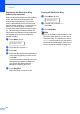

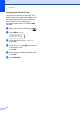
Table Of Contents
- Basic User’s Guide FAX-2840/MFC-7290
- User’s Guides and where do I find them?
- Download optional software from the Brother Solutions Center (FAX-2840 users)
- Table of Contents
- 1 General information
- 2 Loading paper
- 3 Loading documents
- 4 Sending a fax
- 5 Receiving a fax
- 6 Using PC-FAX (For MFC-7290)
- 7 Telephone services and external devices
- 8 Dialing and storing numbers
- 9 Making copies
- 10 How to print from your computer (For MFC-7290)
- 11 How to scan to a computer (MFC-7290 only)
- A Routine maintenance
- B Troubleshooting
- C Menu and features
- D Specifications
- E Appendix
- Index

Chapter 7
40
Changing the Remote Codes 7
The preset Fax Receive Code is l51. The
preset Telephone Answer Code is #51. If you
are always disconnected when accessing
your External TAD, try changing the
three-digit remote codes, for example ###
and 999.
a Make sure you are in FAX mode .
b Press Menu, 2, 1, 4.
Setup Receive
4.Remote Codes
c Press a or b to choose On (or Off).
Press OK.
d If you chose On in step c, enter the new
Fax Receive Code.
Press OK.
e Enter the new Telephone Answer Code.
Press OK.
f Press Stop/Exit.