
User Manual



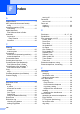

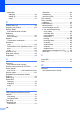

Table Of Contents
- Basic User’s Guide FAX-2840/MFC-7290
- User’s Guides and where do I find them?
- Download optional software from the Brother Solutions Center (FAX-2840 users)
- Table of Contents
- 1 General information
- 2 Loading paper
- 3 Loading documents
- 4 Sending a fax
- 5 Receiving a fax
- 6 Using PC-FAX (For MFC-7290)
- 7 Telephone services and external devices
- 8 Dialing and storing numbers
- 9 Making copies
- 10 How to print from your computer (For MFC-7290)
- 11 How to scan to a computer (MFC-7290 only)
- A Routine maintenance
- B Troubleshooting
- C Menu and features
- D Specifications
- E Appendix
- Index

125
F
telephone answer code .........................39
Folio
.........................................................16
H
HELP
LCD messages
...................................103
Menu Table
.........................................104
Hook/Hold
........................................... 8, 39
I
Ident-A-Call ..............................................34
Ident-A-Ring
.............................................34
Interface (USB)
......................................120
J
Jacks
EXT
external telephone
.............................38
TAD (answering machine)
.................37
L
Labels ...................................11, 12, 17, 21
LCD (liquid crystal display)
............... 8, 103
M
Machine information
how to reset the machine
....................102
reset functions
....................................101
serial number
......................................101
Macintosh
See Software User's Guide.
Maintenance, routine
replacing
drum unit
............................................62
toner cartridge
....................................55
Manual
dialing
...................................................41
receive
........................................... 26, 28
Memory capacity
....................................114
Menu Table
............................................104
Mode, entering
copy
......................................................45
fax
.........................................................24
scan
........................................................8
Multi-line connections (PBX)
....................38
O
One Touch
changing
............................................... 44
setting up
.............................................. 43
using
..................................................... 41
OPC drum
............................................... 95
Out of Memory message
......................... 72
P
Paper ....................................................... 16
how to load
............................................. 9
in multi-purpose tray
.......................... 11
in paper tray
........................................ 9
recommended
...................................... 18
size
....................................................... 17
tray capacity
......................................... 17
type
...................................................... 17
PC-FAX
See Software User's Guide.
Personalized Ring
................................... 34
Presto! PageManager
See Software User's Guide. See also Help
in the Presto! PageManager application.
Print
difficulties
....................................... 84, 88
document from your computer
............. 46
drivers
................................................ 120
quality
................................................... 90
Resolution
.......................................... 120
specifications
...................................... 120
Print quality
.............................................. 92
Printing
See Software User's Guide.
Programming your machine
.................. 103
Q
Quality
printing
................................................. 90
Quick dial
................................................. 43
group dial
changing
............................................ 44
one touch dial
changing
............................................ 44
setting up
........................................... 43
using
.................................................. 41
Search
.................................................. 42