
User Manual

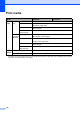



Table Of Contents
- Basic User’s Guide FAX-2840/MFC-7290
- User’s Guides and where do I find them?
- Download optional software from the Brother Solutions Center (FAX-2840 users)
- Table of Contents
- 1 General information
- 2 Loading paper
- 3 Loading documents
- 4 Sending a fax
- 5 Receiving a fax
- 6 Using PC-FAX (For MFC-7290)
- 7 Telephone services and external devices
- 8 Dialing and storing numbers
- 9 Making copies
- 10 How to print from your computer (For MFC-7290)
- 11 How to scan to a computer (MFC-7290 only)
- A Routine maintenance
- B Troubleshooting
- C Menu and features
- D Specifications
- E Appendix
- Index

122
3
PC-Fax supports black and white only.
For the latest driver updates, visit us at http://solutions.brother.com/.
All trademarks, brand and product names are the property of their respective companies.
Consumable items D
1
Approx. cartridge yield is declared in accordance with ISO/IEC 19752.
2
Drum yield is approximate, and may vary by type of use.
Model FAX-2840 MFC-7290 Order No.
Toner
Cartridge
Inbox
Approx. 700 pages (A4)
1
—
Standard
Approx. 1,200 pages (A4)
1
TN-420
High
Yield
Approx. 2,600 pages (A4)
1
TN-450
Drum Unit
Approx. 12,000 pages (A4)
2
DR-420