
User Manual
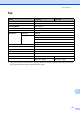



Table Of Contents
- Basic User’s Guide FAX-2840/MFC-7290
- User’s Guides and where do I find them?
- Download optional software from the Brother Solutions Center (FAX-2840 users)
- Table of Contents
- 1 General information
- 2 Loading paper
- 3 Loading documents
- 4 Sending a fax
- 5 Receiving a fax
- 6 Using PC-FAX (For MFC-7290)
- 7 Telephone services and external devices
- 8 Dialing and storing numbers
- 9 Making copies
- 10 How to print from your computer (For MFC-7290)
- 11 How to scan to a computer (MFC-7290 only)
- A Routine maintenance
- B Troubleshooting
- C Menu and features
- D Specifications
- E Appendix
- Index

118
Copy D
Model FAX-2840 MFC-7290
Color/Monochrome Monochrome
Copy Width Max. 204 mm (A4 size)
Multiple Copies Stacks or Sorts up to 99 pages
Reduce/Enlarge 25% to 400% (in increments of 1%)
Resolution Up to 300 600 dpi
First Copy Out Time Less than 12 seconds (from Ready
mode and standard tray)
Less than 11 seconds (from Ready
mode and standard tray)