
User Manual
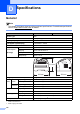
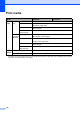
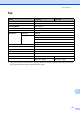

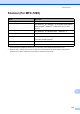
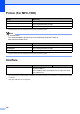


Table Of Contents
- Basic User’s Guide FAX-2840/MFC-7290
- User’s Guides and where do I find them?
- Download optional software from the Brother Solutions Center (FAX-2840 users)
- Table of Contents
- 1 General information
- 2 Loading paper
- 3 Loading documents
- 4 Sending a fax
- 5 Receiving a fax
- 6 Using PC-FAX (For MFC-7290)
- 7 Telephone services and external devices
- 8 Dialing and storing numbers
- 9 Making copies
- 10 How to print from your computer (For MFC-7290)
- 11 How to scan to a computer (MFC-7290 only)
- A Routine maintenance
- B Troubleshooting
- C Menu and features
- D Specifications
- E Appendix
- Index

116
Print media D
1
For labels, we recommend removing each printed label sheet from the output paper tray immediately after it exits the
machine to avoid the possibility of smudging.
Model FAX-2840 MFC-7290
Paper
Input
Paper
Tray
Paper Type Plain Paper, Thin Paper or Recycled Paper
Paper Size Letter, A4, B5 (ISO/JIS), A5, A5 (Long Edge), B6 (ISO), A6,
Executive, Legal, Folio
Paper Weight
60 to 105 g/m
2
Maximum Paper
Tray Capacity
Up to 250 sheets of 80 g/m
2
Plain Paper
Manual
Feed Slot
(Manual)
Paper Type
Envelope, Labels
1
, Thin Paper, Thick Paper, Recycled Paper,
Bond Paper or Plain Paper
Paper Size Width: 76.2 to 216 mm
Length: 116 to 406.4 mm
Paper Weight
60 to 163 g/m
2
Maximum Paper
Tray Capacity
One sheet at a time 80 g/m
2
Plain Paper
Paper
Output
Face-Down Output Tray
Up to 100 sheets of 80 g/m
2
Plain Paper
Face-Up Output Tray One sheet (face up print delivery to the Face up output tray)