
User Manual
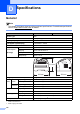
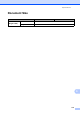
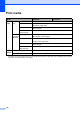
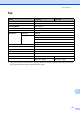

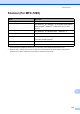


Table Of Contents
- Basic User’s Guide FAX-2840/MFC-7290
- User’s Guides and where do I find them?
- Download optional software from the Brother Solutions Center (FAX-2840 users)
- Table of Contents
- 1 General information
- 2 Loading paper
- 3 Loading documents
- 4 Sending a fax
- 5 Receiving a fax
- 6 Using PC-FAX (For MFC-7290)
- 7 Telephone services and external devices
- 8 Dialing and storing numbers
- 9 Making copies
- 10 How to print from your computer (For MFC-7290)
- 11 How to scan to a computer (MFC-7290 only)
- A Routine maintenance
- B Troubleshooting
- C Menu and features
- D Specifications
- E Appendix
- Index

114
D
General D
Note
This chapter provides a summary of the machines’ specifications. For additional specifications
visit us at http://www.brother.com/
for details.
1
USB connected to PC
2
When copying one sheet
Specifications D
Model FAX-2840 MFC-7290
Printer Type Laser
Print Method Electrophotographic Laser Printer
Memory Capacity 16 MB
LCD (liquid crystal display) 16 characters 2 lines
Power Source 110 - 120 V AC 50/60 Hz
Power
Consumption
1
(Average)
Peak Approx. 1,080 W at 25 C
Copying
2
Approx. 420 W at 25 C
Ready Approx. 55 W at 25 C
Deep Sleep Approx. 1.5 W
Dimensions
Weights (with consumables) 9.0 kg
Noise
level
Sound
power
Operating (Printing) L
WAd = 6.18 B (A)
Standby L
WAd = 4.25 B (A)
Sound
pressure
Operating (Printing) L
PAm = 53 dB (A)
Standby L
PAm = 30 dB (A)
Temperature Operating 10 to 32.5 C
Storage 0 to 40 C
Humidity Operating 20 to 80% (without condensation)
Storage 10 to 90% (without condensation)
ADF (automatic document feeder)
Up to 20 pages 80 g/m
2
360 mm
311 mm
368 mm