
User Manual

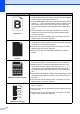
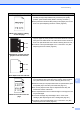
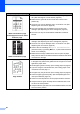

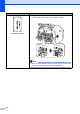

Table Of Contents
- Basic User’s Guide FAX-2840/MFC-7290
- User’s Guides and where do I find them?
- Download optional software from the Brother Solutions Center (FAX-2840 users)
- Table of Contents
- 1 General information
- 2 Loading paper
- 3 Loading documents
- 4 Sending a fax
- 5 Receiving a fax
- 6 Using PC-FAX (For MFC-7290)
- 7 Telephone services and external devices
- 8 Dialing and storing numbers
- 9 Making copies
- 10 How to print from your computer (For MFC-7290)
- 11 How to scan to a computer (MFC-7290 only)
- A Routine maintenance
- B Troubleshooting
- C Menu and features
- D Specifications
- E Appendix
- Index

Troubleshooting
95
B
White lines, bands or ribbing
across the page
Check the machine’s environment. Conditions such as high
humidity and high temperatures may cause this print quality
problem. (See Product Safety Guide: Choosing a location.)
If the problem is not solved after printing a few pages, put in a new
drum unit. (See Replacing the drum unit uu page 62.)
White Spots on black text and
graphics at 94 mm intervals
Black Spots at 94 mm intervals
Make ten copies of a blank, white sheet of paper. (See How to
copy uu page 45.) If the problem is not solved, the drum unit may
have glue from a label stuck on the OPC drum surface. Clean the
drum unit. (See Advanced User’s Guide: Cleaning the drum unit .)
The drum unit may be damaged. Put in a new drum unit. (See
Replacing the drum unit uu page 62.)
Black toner marks across the
page
If you use label sheets for laser printers, the glue from the sheets
may sometimes stick to the OPC drum surface. Clean the drum
unit. (See Advanced User’s Guide: Cleaning the drum unit)
Make sure that you use paper that meets our specifications. (See
Acceptable paper and other print media uu page 16.)
Do not use paper that has clips or staples because they will
scratch the surface of the drum.
If the unpacked drum unit is in direct sunlight or room light, the unit
may be damaged.
The toner cartridge may be damaged. Put in a new toner
cartridge. (See Replacing the toner cartridge uu page 55.)
The drum unit may be damaged. Put in a new drum unit. (See
Replacing the drum unit uu page 62.)
Examples of poor print quality Recommendation
94 mm
94 mm
94 mm
94 mm
ABCDEFGH
abcdefghijk
ABCD
abcde
01234