
User Manual
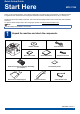
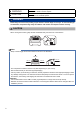
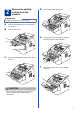


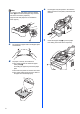



Table Of Contents
- Quick Setup Guide MFC-7290
- Start Here
- 1 Unpack the machine and check the components
- 2 Remove the packing material from the machine
- 3 Attach the ADF Document Output Support
- 4 Install the Handset
- 5 Load paper in the paper tray
- 6 Connect the power cord and telephone line
- 7 Choose a Receive Mode
- 8 Set the LCD contrast (if needed)
- 9 Set the date and time
- 10 Set your Station ID
- 11 Fax Transmission Report
- 12 Set the telephone line compatibility
- 13 Dial Prefix
- 14 Automatic Daylight Saving Time
- 15 Choose your Operating System
- For Windows® Users (Windows® XP/XP Professional x64 Edition/Windows Vista®/Windows® 7)
- For Macintosh Users (Mac OS X 10.5.8 - 10.7.x)
- Other Information
- Consumables
- Start Here

2
WARNING
Plastic bags are used in the packing of your machine. Plastic bags are not toys. To avoid the danger
of suffocation, keep these bags away from babies and children and dispose of them correctly.
CAUTION
CAUTION
When moving the machine, grasp the side handholds firmly from the front of the machine.
WARNING
indicates a potentially hazardous situation which, if not avoided,
could result in death or serious injuries.
CAUTION
indicates a potentially hazardous situation which, if not avoided, may
result in minor or moderate injuries.
WARNING
CAUTION
Note
• Keep a minimum gap around the machine as shown in the illustration.
• The components included in the box may differ depending on your country.
• We recommend that you save the original packaging.
• If for any reason you must ship your machine, carefully repack the machine in the original packaging to avoid
any damage during transit. The machine should be adequately insured with the carrier. For how to repack
the machine, see Packing and shipping the machine in the Advanced User’s Guide.
USB cable
• It is recommended to use a USB 2.0 cable (Type A/B) that is no longer than 6 feet (2 meters).
• DO NOT connect the interface cable at this time. Connecting the interface cable is done during the MFL-Pro
installation process.
100 mm
100 mm
210 mm
250 mm