
User Manual
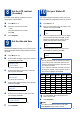

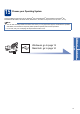
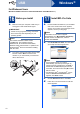

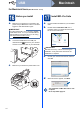
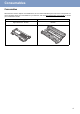
Table Of Contents
- Quick Setup Guide MFC-7290
- Start Here
- 1 Unpack the machine and check the components
- 2 Remove the packing material from the machine
- 3 Attach the ADF Document Output Support
- 4 Install the Handset
- 5 Load paper in the paper tray
- 6 Connect the power cord and telephone line
- 7 Choose a Receive Mode
- 8 Set the LCD contrast (if needed)
- 9 Set the date and time
- 10 Set your Station ID
- 11 Fax Transmission Report
- 12 Set the telephone line compatibility
- 13 Dial Prefix
- 14 Automatic Daylight Saving Time
- 15 Choose your Operating System
- For Windows® Users (Windows® XP/XP Professional x64 Edition/Windows Vista®/Windows® 7)
- For Macintosh Users (Mac OS X 10.5.8 - 10.7.x)
- Other Information
- Consumables
- Start Here

17
Consumables
Consumables
When the time comes to replace consumable items, an error will be indicated by the LCD on the control panel. For
more information about the consumables for your machine, visit us at http://www.brother.com/original/
or contact
your local Brother reseller.
Toner cartridges Drum unit
Standard Toner: TN-420
High Yield Toner: TN-450
DR-420