
User Manual
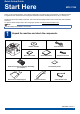
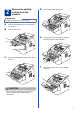


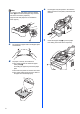



Table Of Contents
- Quick Setup Guide MFC-7290
- Start Here
- 1 Unpack the machine and check the components
- 2 Remove the packing material from the machine
- 3 Attach the ADF Document Output Support
- 4 Install the Handset
- 5 Load paper in the paper tray
- 6 Connect the power cord and telephone line
- 7 Choose a Receive Mode
- 8 Set the LCD contrast (if needed)
- 9 Set the date and time
- 10 Set your Station ID
- 11 Fax Transmission Report
- 12 Set the telephone line compatibility
- 13 Dial Prefix
- 14 Automatic Daylight Saving Time
- 15 Choose your Operating System
- For Windows® Users (Windows® XP/XP Professional x64 Edition/Windows Vista®/Windows® 7)
- For Macintosh Users (Mac OS X 10.5.8 - 10.7.x)
- Other Information
- Consumables
- Start Here

10
11
Fax Transmission Report
Your Brother machine is equipped with a
Transmission Verification Report that can be used as
confirmation that you sent a fax. This report lists the
name or fax number of the receiving party, the date,
time, and duration of the transmission, the number of
pages transmitted, and whether or not the
transmission was successful. If you want to use the
Fax Transmission Report feature see Printing reports
in the Advanced User’s Guide.
12
Set the telephone line
compatibility
If you are connecting the machine to a VoIP service
(over the Internet) you need to change the
compatibility setting.
a Press Menu, 2, 0, 1.
b Press a or b to choose Basic(for VoIP).
Press OK.
c Press Stop/Exit.
13
Dial Prefix
The dial prefix setting will automatically dial a
predefined number before every fax number you dial.
For example: If your phone system requires a 9 to dial
an outside number this setting will automatically dial 9
for every fax you send.
a Press Menu, 0, 5.
b Enter the prefix number (up to 5 digits) on the
dial pad, and then press OK.
c Press Stop/Exit.
14
Automatic Daylight
Saving Time
You can set the machine to change automatically for
Daylight Saving Time. It will reset itself forward one
hour in the Spring and backward one hour in the Fall.
a Press Menu, 0, 2, 2.
b Press a or b to choose On (or Off).
Press OK.
c Press Stop/Exit.
Note
If you are using an analog telephone line you can
skip this step.
Note
• You can use the numbers 0 to 9, #, l and !.
(Press Hook/Hold to display “!”.)
• You cannot use ! with any other numbers or
characters.
• If your telephone system requires a timed break
recall (hookflash), press Hook/Hold to enter the
break.