
User`s guide



ControlCenter4
56
4
Device Settings tab 4
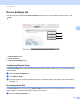
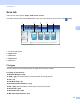
This section briefly introduces the Device Settings tab function. For more details of each function, click
Help.
1 Remote Setup button
2 Quick Dial button
3 Device Scan Settings button
Configuring Remote Setup 4
The Remote Setup button opens the Remote Setup Program window; allowing you to configure the settings
of the machine.
a Select the Device Settings tab.
b Click Remote Setup.
c The Remote Setup Program window will appear. For Remote Setup configuration, see Remote Setup
uu page 78.
Accessing Quick Dial 4
The Quick Dial button lets you open the Address Book window in the Remote Setup Program. You can then
easily register or change the Quick Dial numbers from your PC.
a Select the Device Settings tab.