
User`s guide



ControlCenter4
54
4
PC-FAX tab 4
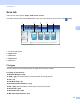
This section briefly introduces the PC-FAX tab function. For more details of each function, click Help.
Note
The PC-FAX software can only send Black & White fax documents in Letter size.
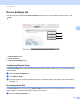
1 Send Image File button
2 Send Scanned Image button
3 View Received PC-FAX button
4 PC Scan setting area
5 Scan Image area
6 Send button
Sending an image file from your computer 4
The Send Image File button lets you send an image file as a fax from your computer using the Brother
PC-FAX software.
a Select the PC-FAX tab.
b Click Send Image File.
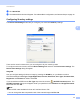
c Click on the folder tree to browse for the folder where the image you want to send is located. Then select
the file you want to send.