
User Manual
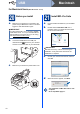
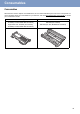
Table Of Contents
- Quick Setup Guide FAX-2950/MFC-7240/MFC-7290
- Start Here
- 1 Unpack the machine and check the components
- 2 Remove the packing material from the machine
- 3 Attach the ADF Document Output Support
- 4 Install the Handset
- 5 Load paper in the paper tray
- 6 Connect the power cord and telephone line
- 7 Set your country
- 8 Choose a Receive Mode
- 9 Set the LCD contrast (if needed)
- 10 Set the date and time
- 11 Enter personal information (Station ID)
- 12 Fax Transmission Report
- 13 Set tone or pulse dialling mode (not available in New Zealand)
- 14 Set the telephone line compatibility
- 15 Set the telephone line type (Middle East and Africa only)
- 16 Dial Prefix (not available in Middle East and Africa)
- 17 Set Daylight Saving Time (Oceania and Asia only)
- 18 Automatic Daylight Savings Time (Middle East and Africa only)
- 19 Choose your Operating System
- For Windows® Users (Windows® XP/XP Professional x64 Edition/Windows Vista®/Windows® 7)
- For Macintosh Users (Mac OS X 10.5.8 - 10.7.x)
- Other Information
- Consumables
- Start Here

17
Macintosh
USB
Windows
®
USB
Macintosh
22
Download and install
Presto! PageManager
When Presto! PageManager is installed OCR
capability is added to Brother ControlCenter2. You
can easily scan, share and organize photos and
documents using Presto! PageManager.
a On the Brother Support screen, click
Presto! PageManager and follow the
on-screen instructions.
Finish
The installation is now
complete.