
Windows Vista/ Windows 7 Installation Guide



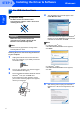
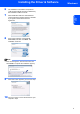

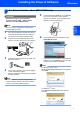
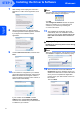
Table Of Contents

Installing the Driver & Software
5
Windows
®
USB
Windows
®
6 The installation of ScanSoft™ PaperPort™
11SE will automatically start and is followed by
the installation of MFL-Pro Suite.
7 When the Brother MFL-Pro Suite Software
License Agreement window appears, click Yes
if you agree to the Software License
Agreement.
8 If this screen appears, choose Local
Connection, and then click Next. The
installation continues.
Note
If this screen appears, click the check box and
click Install to complete the installation properly.
9 When this screen appears, go to the next step.
10 Go to the “How to connect the machine to your
computer” steps.