
User Manual



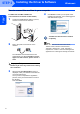


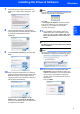
Table Of Contents

Installing the Driver & Software
5
Windows
®
USB
Windows
®
6 The installation of ScanSoft™ PaperPort™
11SE will automatically start and is followed by
the installation of MFL-Pro Suite.
7 When the Brother MFL-Pro Suite Software
License Agreement window appears, click Yes
if you agree to the Software License
Agreement.
8 If this screen appears, choose Local
Connection, and then click Next. The
installation continues.
If this screen appears, choose Standard, and
then click Next. The installation continues.
Note
If this screen appears, click the check box and
click Install to complete the installation properly.
9
When this screen appears, go to the next step.
10
Go to the “How to connect the machine to your
computer” steps for your model.
Model Number Page Number
MFC-7220, MFC-7225N page 6
MFC-3360C page 7