
User Manual


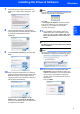


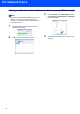

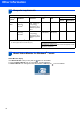

Table Of Contents

Other Information
14
2
Computer requirements
3
About Status Monitor for Windows
®
7 users
Status Monitor display
If the Status Monitor is ON you may find the button on the taskbar.
To show the Status Monitor icon on your taskbar, click the button.
The Status Monitor icon will appear in the small window. Then drag the icon to the taskbar.
Minimum System Requirements and Supported PC Software Functions
Operating
Systems
1
Supported
Functions
Minimum
Processor
Minimum
RAM
Recommended
RAM
Required Hard Disk Space
For
Drivers
For
Applications
Windows
Vista
®
Printing,
Scanning,
PC-FAX
2
Intel
®
Pentium
®
4
or equivalent
64-bit (Intel
®
64 or
AMD64) supported
CPU
512 MB 1 GB 500 MB 500 MB
Windows
®
7
Printing,
Scanning,
PC-FAX
2
Intel
®
Pentium
®
4
or equivalent
64-bit (Intel
®
64 or
AMD64) supported
CPU
1 GB (32-bit)
2 GB (64-bit)
1 GB (32-bit)
2 GB (64-bit)
650 MB 530 MB
1
Microsoft
®
Internet Explorer
®
5.5 or greater.
2
PC FAX supports black and white faxing only.
For the latest driver updates, visit us at
http://solutions.brother.com/
.
All trademarks, brand and product names are property of their
respective companies.