
Owner's Manual

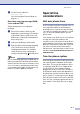



Table Of Contents
- USER’S GUIDE FAX-2820/FAX-2910/FAX-2920/MFC-7220/MFC-7225N
- Brother numbers
- Ordering accessories and supplies
- Safety precautions
- Quick Reference Guide
- Table of Contents
- 1 Introduction
- 2 Getting started
- Initial setup
- General Setup
- Setting the Mode Timer (FAX-2820, FAX-2910 and FAX-2920 only)
- Setting the Mode Timer (MFC-7220 and MFC-7225N only)
- Setting the Paper Type
- Setting the Paper Size
- Setting the Ring Volume
- Setting the Beeper Volume
- Setting the Speaker Volume
- Setting the Handset Volume
- Choosing the Handset Volume (For Volume Amplify)
- Setting Volume Amplify
- Turning on Automatic Daylight Savings Time
- Toner Save
- Sleep Time
- Setting the LCD Contrast
- Security
- TX Lock (FAX-2820, FAX-2910 and MFC-7220 only)
- Memory Security (FAX-2920 and MFC-7225N only)
- Setting Lock
- 3 Setup Send
- 4 Setup Receive
- 5 Quick-Dial numbers and dialing options
- 6 Remote Fax Options
- 7 Printing reports
- 8 Making copies
- 9 Software and Network Features (MFC-7220 and MFC-7225N only)
- 10 Important information
- Standard telephone and FCC Notices These notices are in effect on models sold and used in the United States only.
- Federal Communications Commission (FCC) Declaration of Conformity (USA only)
- Industry Canada Compliance Statement (Canada only)
- Disconnect device
- LAN connection (MFC-7225N only)
- Laser safety
- FDA regulations
- Important safety instructions
- Trademarks
- 11 Troubleshooting and routine maintenance
- Appendix A
- Appendix B
- Glossary
- Specifications
- Product description
- General
- Print media
- Copy
- Fax
- Scanner (MFC-7220 and MFC-7225N only)
- Printer (not available for FAX-2910)
- Interfaces (not available for FAX-2910)
- Download the optional software from the Brother Web Site (FAX-2820 and FAX-2920 users only)
- Computer requirements (not available for FAX-2910)
- Consumable items
- Network (LAN) (MFC-7225N only)
- Index
- Remote Retrieval Access card
- brother USA/CAN

Appendix A
A - 5
Using a cordless external
handset
If your cordless telephone is connected to the
EXT. jack on the machine and you typically
carry the cordless handset elsewhere, it is
easier to answer calls during the Ring Delay.
Changing the remote codes
The preset Fax Receive Code is 51. The
preset Telephone Answer Code is #51. If you
want to, you can replace them with your own
codes.
1
If it is not illuminated in green, press
(Fax).
2
Press Menu/Set, 2, 1, 4.
3
Press ▲ or ▼ to select On (or Off).
Press Menu/Set.
4
Enter the new Fax Receive Code.
Press Menu/Set.
5
Enter the new Telephone Answer Code.
Press Menu/Set.
6
Press Stop/Exit.
Note
■ If you are always disconnected when
accessing your external TAD remotely, try
changing the Fax Receive Code and
Telephone Answer Code to another
three-digit code (such as ### and 999)
■ Remote Codes might not work with some
telephone systems.
Connecting an external
device to your machine
Connecting an external
telephone
You can connect a separate telephone (or
telephone answering device) directly to your
machine as shown in the diagram below.
Connect the telephone line cord to the jack
labeled EXT. in the left of the machine.
When you are using an external phone, the
LCD shows
Ext. Tel in Use.
Connecting an external
telephone answering device
(TAD)
Sequence
You may choose to connect an external
answering device. However, when you have
an external TAD on the same telephone line
as the machine, the TAD answers all calls
and the machine “listens” for fax calling
(CNG) tones. If it hears them, the machine
takes over the call and receives the fax. If it
does not hear CNG tones, the machine lets
the TAD continue playing your outgoing
message so your caller can leave you a voice
message.
4.Remote Code
Extension
Telephone
External
Telephone