
Network User's Guide
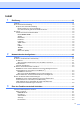
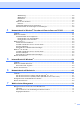
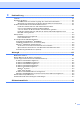
Table Of Contents
- NETZWERK BENUTZERHANDBUCH
- Inhalt
- 1.Einführung
- 2.Netzwerkdrucker konfigurieren
- 3.Über das Funktionstastenfeld einrichten
- 4.Netzwerkdruck in Windows®: Drucken mit Peer-to-Peer und TCP/IP
- 5.Internet-Druck für Windows®
- 6.Netzwerkdruck mit Macintosh®
- 7.Web-basiertes Management
- 8.Problemlösung
- Anhang A
- Mit Diensten arbeiten
- Weitere Optionen die IP-Adresse einzurichten (nur für fortgeschrittene Anwender und Administratoren)
- Print/ScanServer-Spezifikationen
- Funktionsübersicht und werkseitige Voreinstellungen
- Stichwortverzeichnis

ii
BITTE Technische und funktionelle Unterstützung erhalten Sie nur von dem Land, in dem
BEACHTEN: Sie das Gerät gekauft haben.
In den USA 1-800-276-7746
In Kanada 1-877-BROTHER
In Europa: Besuchen Sie http://www.brother.com
. Hier erhalten Sie Informationen, wie Sie mit
Ihrer Brother-Niederlassung in Kontakt treten können.
Kommentare oder Vorschläge nehmen wir gerne schriftlich entgegen:
In Europa European Technical Services
1 Tame Street
Audenshaw
Manchester, M34 5JE
UK
In den USA Printer Customer Support
Brother International Corporation
15 Musick
Irvine, CA 92618
In Kanada Brother International Corporation (Canada), Ltd.
- Marketing Dept.
1, rue Hôtel de Ville
Dollard-des-Ormeaux, PQ, Canada H9B 3H6
Brother fax-back system (nur in den USA)
Brother Customer Service has set up an easy-to-use fax-back system so you can get instant answers to
common technical questions and information about our products. This is available 24 hours a day, seven
days a week. You can use the system to send the information to any fax machine.
Call the number below and follow the recorded instructions to receive a fax about how to use the system
and an Index of the subjects you can get information about.