
Multi-Function Center User's Guide


Troubleshooting and Routine Maintenance
143
B
Checking the ink volume B
Although an ink volume icon appears on the
LCD, you can use the Ink Management key
or Menu, a or b keys to see a large graph
showing the ink that is left in each cartridge.
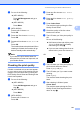
a Do one of the following:
(MFC-680CN)
Press Ink Management and go to
step c.
(MFC-885CW)
Press Menu.
b (MFC-885CW)
Press
a
or
b
to choose
Ink
.
Press OK.
c Press a or b to choose Ink Volume.
Press OK.
The LCD shows the ink volume.
d Press Stop/Exit.
Note
You can check the ink volume from your
computer. (See Printing for Windows
®
or
Printing and Faxing for Macintosh
®
in the
Software User’s Guide on the CD-ROM.)
Uninstalling and installing the
handset and handset cradle
(MFC-680CN only) B
If you do not use the handset you can remove
the handset and handset cradle.
Uninstalling the handset and handset
cradle B
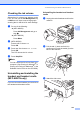
a Unplug the curled handset cord from the
machine.
b Pull the tab (1) back and hold it in
position as you push the cradle (2) to the
back of the machine.
c Attach the side cover.
1
2