
Multi-Function Center User's Guide




Printing photos from a memory card or USB Flash memory drive
99
14
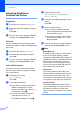
Print Speed and Quality 14
a Press a or b to choose
Print Quality.
b Press d or c to choose Normal or
Photo.
Press OK.
c If you do not want to change additional
settings, press Colour Start to print.
Paper options 14
Paper Type 14
a Press a or b to choose Paper Type.
b Press d or c to choose the paper type
you are using, Plain Paper,
Inkjet Paper, Brother Photo or
Other Photo.
Press OK.
c If you do not want to change additional
settings, press Colour Start to print.
Paper and print size 14
a Press a or b to choose Paper Size.
b Press d or c to choose the paper size
you are using, Letter, 10x15cm,
13x18cm or A4.
Press OK.
c If you chose Letter or A4, press d or c to
choose the Print Size.
Press OK.
d If you do not want to change additional
settings, press Colour Start to print.
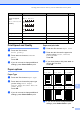
Color Enhance
(Does not appear
when
Photo Effects is
chosen.)
On/Off
White Balance
Sharpness
Color Density
Exit
— 100
Cropping On/Off — 101
Borderless On/Off — 101
Set New Default Yes/No — 101
Factory Reset Yes/No — 101
Menu Selections Options 1 Options 2 Page
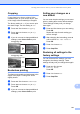
Example: Printed Position for A4 paper
1
10x8cm
2
13x9cm
3
15x10cm
4
18x13cm
5
20x15cm
6
Max. Size