
User`s guide



SETUP RECEIVE 4 - 6
Fax Detect
When you use this feature, you don’t have to press Mono Start or
Colour Start, or the Fax Receive Code 51 ( 91 for New
Zealand) when you answer a fax call. Selecting On allows the
machine to receive fax calls automatically, even if you lift the handset
of an extension or external phone. When you see Receiving on the
LCD or when you hear ‘chirps’ through the handset of an extension
phone connected to another phone socket, just replace the handset
and your machine will do the rest. Selecting Semi lets the machine
receive the fax only if you’ve answered it at the machine.
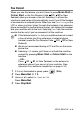
1
If it is not illuminated in green, press (Fax).
2
Press Menu/Set, 2, 1, 3.
3
Use ▲ or ▼ to select On, Semi or Off.
Press
Menu/Set.
4
Press Stop/Exit.
■ If this feature is set to On, but your machine does not connect
a fax call when you lift an extension or external phone
handset, press the Fax Receive Code
51 ( 91 for New
Zealand).
■ We do not recommend having a PC and Fax on the same
phone line.
■ Selecting Off means you’ll have to activate the machine
yourself by pressing
Mono Start or Colour Start on the
machine
—OR—
Press
51 ( 91 for New Zealand) on the external or
extension phone if you are not at your machine. (See
Operation from extension telephones on page A-14.)