
User`s guide



4 - 3 SETUP RECEIVE
Setting the Ring Delay
The Ring Delay sets the number of times the machine rings before it
answers in Fax Only, Fax/Tel and TAD:Msg Mgr modes. If you
have extension phones on the same line as the machine or subscribe
to the telephone company’s Distinctive Ring service, keep the Ring
Delay setting of 4.
(See Fax Detect on page 4-6 and Operation from extension
telephones on page A-14.)
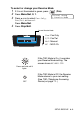
1
If it is not illuminated in green, press (Fax).
2
Press Menu/Set, 2, 1, 1.
3
Press ▲ or ▼ to select Ring Delay.
Press
Menu/Set.
4
Press ▲ or ▼ to select how many
times the line rings before the machine answers (02-10 for
Australia, 01-10 for New Zealand, 0-10 for some countries).
Press
Menu/Set.
(If you select 00, the line won’t ring at all.)
5
Press Stop/Exit.
Toll Saver must be Off to use the Ring Delay setting.
(See Setting Toll Saver (TAD mode) on page 4-4.)
Ring Delay
Ring Delay