
User Manual


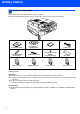
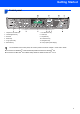


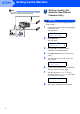

Table Of Contents
- Quick Setup Guide MFC-640CW
- Table of Contents
- Getting Started
- STEP1 Setting Up the Machine
- 1 Removing the protective parts
- 2 Installing the handset
- 3 Loading paper
- 4 Installing the phone line and power cord
- 5 Set Your Country (For Australia / New Zealand Customer Only)
- 6 Installing the ink cartridges
- 7 Print quality check
- 8 Setting the date and time
- 9 Setting your station ID
- 10 Choosing a Receive Mode
- 11 Setting up the TAD
- STEP2 Installing the Driver & Software
- For Network Users
- Consumables and Options
- brother ARL/ASA/NZ

Table of Contents
1
Getting Started
Carton components...................................................................................................................................... 2
Control panel................................................................................................................................................ 3
STEP1 –
Setting Up the Machine
Removing the protective parts ..................................................................................................................... 4
Installing the handset .................................................................................................................................. 4
Loading paper .............................................................................................................................................. 4
Installing the phone line and power cord...................................................................................................... 5
Set Your Country (For Australia / New Zealand Customer Only)................................................................. 6
Installing the ink cartridges........................................................................................................................... 7
Print quality check ........................................................................................................................................ 9
Setting the date and time ........................................................................................................................... 10
Setting your station ID................................................................................................................................ 10
Choosing a Receive Mode ......................................................................................................................... 11
Setting up the TAD..................................................................................................................................... 11
STEP2 –
Installing the Driver & Software
Windows
®
For USB Interface Users
(For Windows
®
98/98SE/Me/2000 Professional/XP) ................................................................................ 14
For Wired Network Interface Users
(For Windows
®
98/98SE/Me/2000 Professional/XP) ................................................................................ 17
For Wireless Network Users
(For Windows
®
98/98SE/Me/2000 Professional/XP in infrastructure mode) ............................................ 20
Macintosh
®
For USB Interface Users ........................................................................................................................... 24
For Mac OS
®
X 10.2.4 or greater......................................................................................................... 24
For Mac OS
®
9.1 to 9.2........................................................................................................................ 27
For Wired Network Interface Users .......................................................................................................... 29
For Mac OS
®
X 10.2.4 or greater......................................................................................................... 29
For Mac OS
®
9.1 to 9.2........................................................................................................................ 32
For Wireless Network Users ..................................................................................................................... 34
For Mac OS
®
X 10.2.4 or greater in infrastructure mode..................................................................... 34
For Network Users
Installing the BRAdmin Professional configuration utility ........................................................................... 39
Setting your IP address, Subnet Mask and Gateway using BRAdmin Professional
(For Windows
®
users) ................................................................................................................................ 39
How to set the machine’s network settings to wireless LAN or wired LAN ................................................ 40
Consumables and Options
Replacement consumables........................................................................................................................ 41
Ink cartridge .......................................................................................................................................... 41